Skip to content
pvmehta.com

pvmehta.com

  • Home
  • About Me
  • Toggle search form
  • newupload.html PHP/MYSQL/Wordpress
  • Find long Running Transaction Linux/Unix
  • Create type and Grant on it. Oracle
  • move_arch_files.ksh Linux/Unix
  • SQL_PROFILE – I explaination Oracle
  • Locktree.sql Oracle
  • scp with ssh2 Linux/Unix
  • Composite Index creation tip from Vivek Oracle
  • good linux notes Linux/Unix
  • fdisk -l explaination about Primary-Logical-Extended Partitions Linux/Unix
  • Good Doc 28-JUN-2006 Oracle
  • initUOCIOTTO.ora Oracle
  • temp_use.sql diplays usage of temp ts Oracle
  • Looping for remote servers and find its database from oratab file. Linux/Unix
  • OEM-troubleshooting on 20-MAY-08 Oracle

Move WordPress site from one hosting service to other.

Posted on 06-Jun-202306-Jun-2023 By Admin No Comments on Move WordPress site from one hosting service to other.

We need to follow the steps below for moving website from one hosting provider to other hosting provider.

At Source Hosting 

  •  Take backup of existing website. This will take complete backup of all your WP files plus SQL file for database.  The final backup file will be in “.tar.gz” format. 

At Target Hosting

  • Create the new website domain. Make sure not to install any WordPress here.
 
  • From your hosting account, You need to go to “Files” section.  Then select “Import website”.
 
  • Upload the “X.tar.gz” file here and press “import”.  This will finish import of all WordPress files and a SQL script file for database.  Remember here one thing that database is not created yet.  So when you try to access the web site, you will get database connectivity error.
  • Now, from hosting account, go to database section and Create an empty database. Select database name, User name and password.  Please record these information as we need this to update “wp_config.php” file from public_html folder.
 
  • Now, empty database is created. To import the SQL file from above step, we need to compress that SQLFILE.  Make a compressed zip folder of this SQL by right click on SQLfile and selecting “send to compressed zip folder” as below.
 

  •  This will create a .ZIP file that will only that SQL file. 
 
  • From hosting account and database section, open PHPMYADMIN. This will open the PHPMYADMIN editor. 
 
  •  In PHPMYADMIN editor, you need to import the SQL zip file as mentioned below.
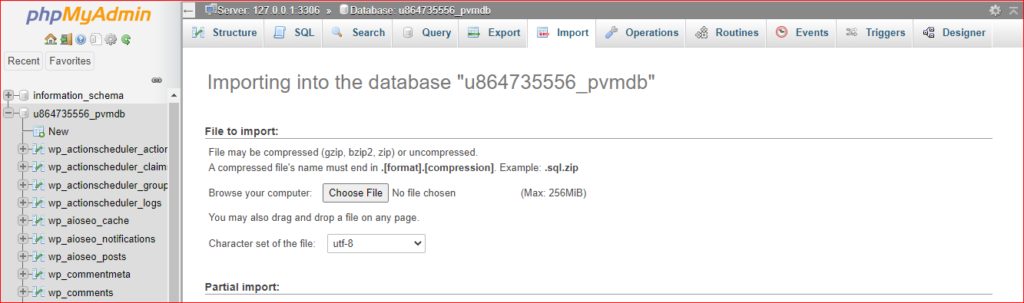
phpmyadmin

  • Once your SQL.zip is Imported, then all posts, comments will be there
  • Validate your website by checking posts and comments.
  • New hosting provider may ask you to update the WordPress version for better functionality, so do it after taking new fresh backup. 

More information on related articles

More information on WordPress learning

PHP/MYSQL/Wordpress

Post navigation

Previous Post: How to hide author name in WordPress BLOG
Next Post: How to collect CPU usage on Linux using Shell script

Related Posts

  • newupload.html PHP/MYSQL/Wordpress
  • How to hide author name in WordPress BLOG PHP/MYSQL/Wordpress
  • My FTP Job Scheduling for www.pvmehta.com PHP/MYSQL/Wordpress
  • Windows based Command line mailing program like mailx (Sednmail for windows) PHP/MYSQL/Wordpress
  • upload.html PHP/MYSQL/Wordpress
  • For Perl DBI installation and testing program PHP/MYSQL/Wordpress

Leave a Reply Cancel reply

Your email address will not be published. Required fields are marked *

Categories

  • Ansible (0)
  • AWS (2)
  • Azure (1)
  • Django (0)
  • GIT (1)
  • Linux/Unix (149)
  • MYSQL (5)
  • Oracle (393)
  • PHP/MYSQL/Wordpress (10)
  • POSTGRESQL (1)
  • Power-BI (0)
  • Python/PySpark (7)
  • RAC (17)
  • rman-dataguard (26)
  • shell (149)
  • SQL scripts (342)
  • SQL Server (6)
  • Uncategorized (0)
  • Videos (0)

Recent Posts

  • Complete Git Tutorial for Beginners25-Dec-2025
  • Postgres DB user and OS user.25-Dec-2025
  • Trace a SQL session from another session using ORADEBUG30-Sep-2025
  • SQL Server Vs Oracle Architecture difference25-Jul-2025
  • SQL Server: How to see historical transactions25-Jul-2025
  • SQL Server: How to see current transactions or requests25-Jul-2025
  • T-SQL Vs PL/SQL Syntax25-Jul-2025
  • Check SQL Server edition25-Jul-2025
  • Checking SQL Server Version25-Jul-2025
  • Oracle vs MYSQL Architecture differences (For DBAs)24-Jul-2025

Archives

  • 2025
  • 2024
  • 2023
  • 2010
  • 2009
  • 2008
  • 2007
  • 2006
  • 2005
  • on IBM-AIX for display Linux/Unix
  • Export Import with QUERY Oracle
  • Good RAC & Standby Notes Oracle
  • OEM-troubleshooting on 20-MAY-08 Oracle
  • Running some SQL on multiple databases connecting using monitoring userid and password Linux/Unix
  • Oracle vs MYSQL Architecture differences (For DBAs) MYSQL
  • Recovering lost SYS password Oracle
  • chk_space_SID.ksh Linux/Unix

Copyright © 2026 pvmehta.com.

Powered by PressBook News WordPress theme